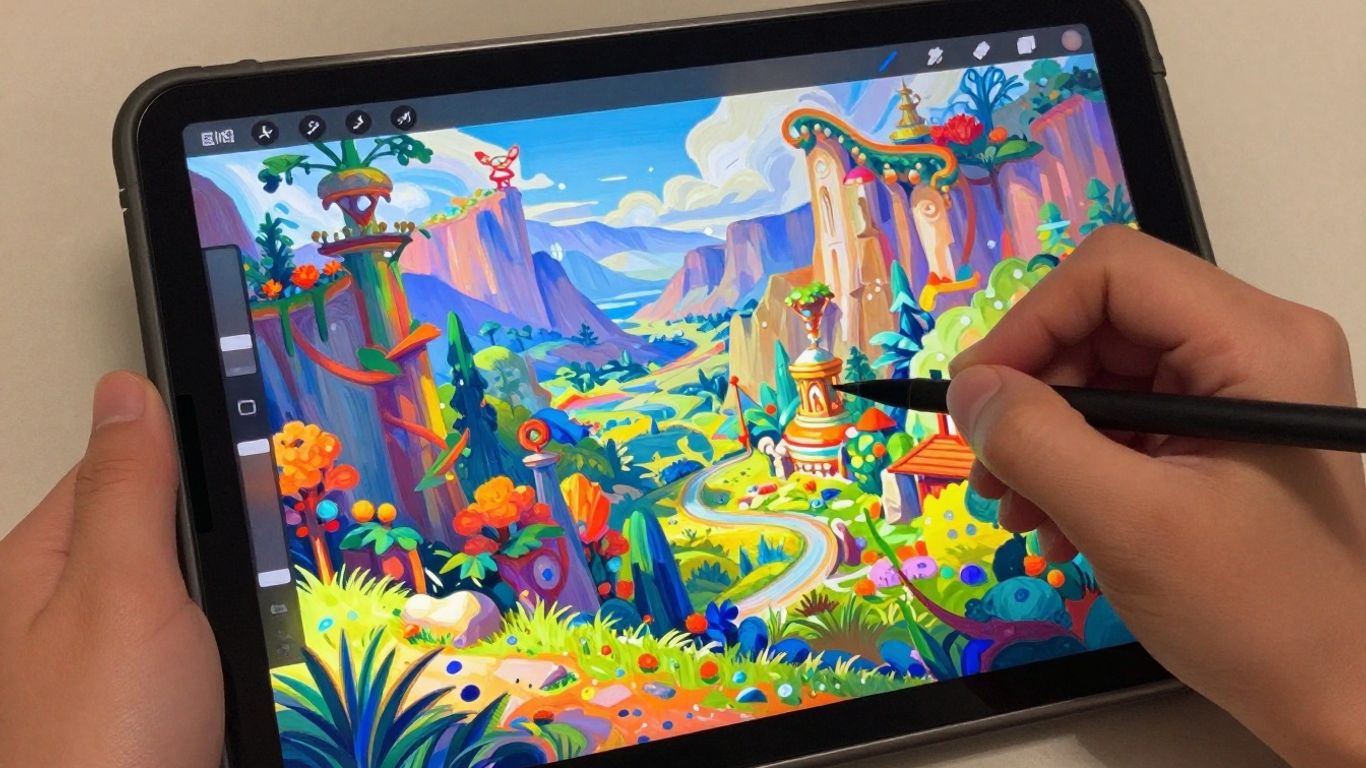
So, you’re thinking about getting into digital art, or maybe you’re already drawing and looking for a new tool. I’ve been messing around with ibis paint x online, and honestly, it’s pretty neat. It’s one of those apps that seems to have a bit of everything, whether you’re just doodling or trying to make something more serious. I wanted to share some of what I found out about it.
Key Takeaways
- ibis Paint X is a drawing app available on phones and tablets, offering many features similar to desktop programs for creating digital art, illustrations, and manga.
- The app provides a huge selection of brushes, materials, and filters to help artists achieve different styles and effects in their work.
- ibis Paint X supports a workflow using layers, blending modes, and clipping masks, which is helpful for organizing and refining your artwork.
- It includes specific tools for manga creation, vector drawing, and even animation, making it quite versatile.
- A notable feature is the ability to record and share your drawing process as a video, and there’s also a community aspect where artists can interact.
Discovering the Versatility of ibis Paint X Online

So, you’ve heard about ibis Paint X and are wondering what all the fuss is about? It’s a drawing app that’s become super popular, and for good reason. It’s packed with features that make digital art creation accessible, whether you’re just doodling or trying to make something more serious. This app really bridges the gap between traditional sketching and digital painting.
What is ibis Paint X?
Basically, ibis Paint X is a digital drawing and painting application available on phones and tablets. It’s been downloaded millions of times, which tells you something about how many people find it useful. It’s not just for pros; it’s designed to be used by anyone, from folks just starting out to those who have been drawing for years. It offers a huge range of tools that you’d typically find in more complex desktop software, but in a package that fits right in your pocket.
Bridging Traditional and Digital Art
One of the coolest things about ibis Paint X is how it lets you bring your physical sketches into the digital world. You can snap a photo of a drawing you did with a pencil or pen, import it into the app, and then use it as a base. From there, you can trace over it, add color, and refine it digitally. It makes the transition from paper to screen feel really natural. The app has brushes that mimic traditional tools, so your digital work can still have that familiar feel.
A Powerful Tool for All Skill Levels
It doesn’t matter if you’re a total beginner or have been drawing for ages; ibis Paint X has something for you. For newcomers, it’s a great place to start because you can learn the basics without getting too overwhelmed. You can start with a simple canvas, experiment with a few brushes, and use layers to keep things organized. As you get more comfortable, you can explore more advanced features. The sheer number of brushes available, over 47,000, means you’ll always have a new tool to try out for different effects. You can find a lot of tutorials online to help you get started with ibis Paint X.
The app is constantly being updated, which means new features are always being added. This keeps the software feeling fresh and exciting, even for long-time users. It’s a platform that grows with you as your artistic skills develop.
Unlocking Creative Potential with ibis Paint X Features
So, you’ve got ibis Paint X open and you’re ready to make some art. But where do you even start with all the options? Don’t worry, it’s not as overwhelming as it looks. The app is packed with tools that really let you get creative, whether you’re just doodling or trying to make something super detailed.
Extensive Brush Library for Diverse Styles
First off, let’s talk brushes. ibis Paint X has a mind-boggling number of them – we’re talking over 47,000. Seriously. You’ve got everything from realistic pens and pencils that feel like the real deal, to airbrushes, oil paints, and even fun stamp brushes. You can tweak the size, how see-through it is, and even how the line starts and ends. It’s pretty wild how much you can change a single brush to fit exactly what you’re going for. This huge selection means you’re not stuck with just a few basic tools; you can really experiment with different textures and looks.
Vast Material Collection for Rich Artwork
Beyond brushes, there’s a massive library of materials. Think of these as pre-made textures, patterns, and even objects you can drop into your artwork. There are over 23,000 of these, covering everything from traditional Japanese patterns and cool backgrounds to little icons like food, plants, and accessories. Need a quick background for a poster or a cool texture for a character’s clothing? This collection is a lifesaver. It saves you tons of time and adds a professional polish to your work.
High-Quality Filters for Enhanced Effects
Once you’ve got your drawing down, the filters are where you can really make it pop. ibis Paint X includes more than 80 filters, and they’re not just basic Instagram-style effects. You can do things like change colors, adjust tones with curves, add blur, or even create cool watercolor effects from a photo. There are even some unique ones, like a "Rain" filter that adds moving raindrops. These filters are great for fine-tuning your art, giving it a specific mood, or even turning a regular image into something that looks like it belongs in an anime.
The sheer volume of brushes, materials, and filters available means you’re unlikely to ever run out of ways to express your ideas. It’s like having a whole art studio in your pocket, ready for whatever inspiration strikes.
If you’re looking to get a feel for how these tools can be used, checking out some tutorials on drawing with ibis Paint can give you a great head start.
Mastering ibis Paint X for Digital Creation
Getting a handle on ibis Paint X might seem a bit much at first, especially with all the buttons and menus. But honestly, it’s like learning any new skill – you start with the basics and build from there. It’s not some super complicated software that only pros can figure out. You can totally get the hang of it.
Getting Started with Your Canvas
When you first open ibis Paint X, you’ll see a button to create a new canvas. Don’t overthink the size right away. For most projects, a standard square or a size that fits your tablet screen works just fine. You can always adjust it later if you need to. Think of it as your digital piece of paper. It’s where all the magic begins, whether you’re sketching out a quick idea or planning a detailed illustration. For absolute beginners, checking out some basic guides can really help get you started.
Leveraging Layers for Efficient Workflow
Layers are seriously your best friend in digital art. Imagine them like transparent sheets stacked on top of each other. You can draw your sketch on one layer, then put your line art on a new layer above it. After that, you can add base colors on another layer, and then shading on yet another. This makes fixing mistakes so much easier. If you mess up the shading, you just go to the shading layer and fix it without touching your colors or lines. It keeps everything organized and makes editing a breeze.
- Sketch Layer: Keep your initial drawings here.
- Line Art Layer: Trace over your sketch with clean lines.
- Color Layer: Add your base colors.
- Shading/Highlight Layer: Add depth and dimension.
Exploring Blending Modes and Clipping Masks
Once you’re comfortable with layers, you’ll want to play around with blending modes and clipping masks. Blending modes change how colors interact with the layers below them. For example, ‘Multiply’ is great for adding shadows because it darkens the layer underneath, and ‘Screen’ is good for highlights as it brightens things up. Clipping masks are also super useful. They let you paint only within the lines of the layer directly below. So, if you have a colored shape on one layer, you can clip a new layer to it and paint shading or highlights without going outside the shape’s boundaries. It’s a neat trick that makes shading look much cleaner and more professional.
Working with layers, blending modes, and clipping masks might seem a bit technical at first, but they are the building blocks for creating professional-looking digital art. Don’t be afraid to experiment with them; that’s how you learn what works best for your style and your artwork. ibis Paint X has many tools for refining your work, like the Magic Wand and Eraser to help you out.
Advanced Functionality in ibis Paint X

ibis Paint X isn’t just about basic drawing; it packs some serious power for those who want to push their art further. Whether you’re into detailed illustrations, comics, or even animation, this app has tools that can really help.
Rich Manga Creation Tools
If you’re dreaming of creating your own manga, ibis Paint X has got your back. It includes specialized tools that make the process much smoother. You get:
- Text Tool: Add dialogue and captions with options for vertical and horizontal text, outlines, and font selection. It’s pretty handy for speech bubbles.
- Panel Tools: Easily create comic panels with adjustable borders and backgrounds. You can divide your canvas into multiple frames with just a few taps.
- Screen Tones: A huge library of pre-made tones to add shading and texture to your manga art, just like you’d see in professional publications.
The app offers a lot of features that feel like they belong on a desktop program, but they’re all right there on your tablet or phone. It’s pretty impressive how much they’ve managed to fit in.
Vector Tools for Precision
For artists who need clean lines and scalable artwork, the vector tools are a game-changer. Unlike pixel-based brushes, vector lines are mathematically defined, meaning you can resize them infinitely without losing quality. This is super useful for logos, graphic design elements, or any artwork that might need to be printed at different sizes. You can adjust line thickness, color, and shape with great accuracy. Learning to use these tools can really improve your digital art skills.
Animation Capabilities
Yes, you read that right – ibis Paint X can do animation! It might not be a full-blown animation suite, but it offers enough features to create simple animations and animated GIFs. You can work with individual frames, onion skinning to see previous frames, and export your creations. It’s a fantastic way to bring your characters to life or add subtle motion to your artwork without needing separate, more complex software. This feature really opens up possibilities for dynamic storytelling and visual effects.
Sharing Your Artistic Journey with ibis Paint X
So, you’ve been spending time creating some awesome art with ibis Paint X. That’s fantastic! But what do you do with it all? Well, ibis Paint X makes it super easy to share your work and your process with the world. It’s not just about making art; it’s about connecting with other artists and showing off what you’ve learned.
Recording and Sharing Drawing Processes
One of the coolest things about ibis Paint X is its ability to record your entire drawing session. It captures every stroke, every color choice, and every adjustment you make. This is incredibly useful for a few reasons. First, you can rewatch your own work to see where you might have made mistakes or how you achieved a certain effect. It’s like having a personal art tutor on demand. Second, you can share these time-lapse videos with others. Imagine showing your friends or followers how a complex illustration came to life from a blank canvas! It’s a great way to build an audience and get people interested in your art. You can easily export these videos and share them on social media platforms like X or directly to the ibis Paint community site.
Engaging with the ibis Paint Community
ibis Paint X isn’t just a tool; it’s part of a larger creative ecosystem. The app has a built-in community where artists from all over the globe share their creations. You can browse through countless artworks, get inspired by different styles, and even download other artists’ work to study their techniques. It’s a place to see what’s possible and to find new ideas when you’re feeling stuck. This community aspect is a big reason why so many people find ibis Paint X to be such a welcoming platform for digital art.
Collaborating with Other Artists
Want to team up with someone on a project? ibis Paint X facilitates collaboration too. Through its community features, you can connect with other artists and potentially work on pieces together. This could be anything from a simple art trade to a more complex joint illustration. Learning to work with others can really push your skills and expose you to new ways of thinking about art. It’s a fantastic way to grow as an artist and make new friends who share your passion.
Optimizing Your ibis Paint X Experience
So, you’ve got ibis Paint X fired up and you’re ready to make some art. That’s awesome! But like any tool, getting the most out of it means knowing a few tricks. Let’s talk about making your digital art journey smoother and more productive.
Choosing the Right Drawing Tablet
While you can totally use your finger or a basic stylus, if you’re serious about digital art, a drawing tablet makes a huge difference. These tablets let you use a pen that responds to pressure, meaning you can draw thicker or thinner lines just by pressing harder or softer. It feels way more natural, like drawing on paper. Some tablets even have screens, so you’re drawing directly on your artwork. This direct interaction can really speed up your workflow and make the whole process feel more intuitive. If you’re looking for a tablet that feels like paper, check out options with an AG etching display.
Understanding In-App Purchases and Ads
Ibis Paint X is free to download, which is pretty sweet. But, you’ll notice ads pop up now and then, and some of the really cool brushes or materials might be locked behind a paywall. You can get rid of ads and unlock some features by watching ads or by subscribing to the paid version. It’s a trade-off: free with ads and limited features, or pay a bit for a cleaner experience and more tools. Think about how much you’ll use the app and what features are important to you before deciding.
Personalizing Settings for Age Appropriateness
Ibis Paint X is used by folks of all ages, and the app has some settings to help with that. You can adjust things like age restrictions for certain content or features. It’s good to be aware of these options, especially if younger artists are using the app. Making sure the settings are right for the user can help create a more comfortable and safe drawing environment. Plus, knowing how to adjust brush size and opacity can really help when you’re trying to get those fine details just right. Mastering these basic controls is a great first step for anyone looking to improve their digital art skills.
Wrapping Up Your Digital Art Journey
So, there you have it. Ibis Paint X really is a pretty neat tool for anyone wanting to get into digital art, or even if you’ve been doing it for a while. It’s got a ton of features, most of them free, which is awesome. Whether you’re sketching out a quick idea or working on something more detailed, this app can handle it. Don’t be afraid to just jump in and start playing around with the brushes and layers. You might surprise yourself with what you can create. It’s a great way to bring your ideas to life, right from your phone or tablet.
Frequently Asked Questions
What exactly is ibis Paint X?
ibis Paint X is a super popular drawing app you can get on phones and tablets. It’s like a digital art studio that lets you draw, paint, and create cool pictures. Lots of people use it, from folks just starting out to experienced artists, because it’s packed with awesome tools.
Can I use my real-life drawings with ibis Paint X?
Absolutely! You can take a photo of a sketch you made on paper and bring it into ibis Paint X. Then, you can trace over it, add colors, and make it look like a digital masterpiece. It’s a neat way to mix old-school drawing with digital magic.
Is ibis Paint X free to use?
Yes, you can download and use a lot of ibis Paint X for free! It comes with tons of brushes and features. However, there might be ads, and some extra cool stuff might cost a little bit. But for most artists, the free version is more than enough to get started.
What kind of tools does ibis Paint X have?
ibis Paint X has a huge collection of tools! Think over 47,000 different brushes that can make your art look like it was painted with real oils, watercolors, or even drawn with pencils. Plus, there are thousands of materials like backgrounds and patterns to make your artwork richer.
Can I make comics or animations with ibis Paint X?
You sure can! ibis Paint X has special tools for making comics, like ways to add text and create panels. It also has features that let you create simple animations, turning your drawings into moving pictures. It’s pretty amazing for a mobile app!
How can I share my art or learn from others?
ibis Paint X lets you record your whole drawing process and share it as a video. You can also connect with other artists through its community features. It’s a great way to show off your work, get inspired, and learn new drawing tricks from others.


Leave a Reply