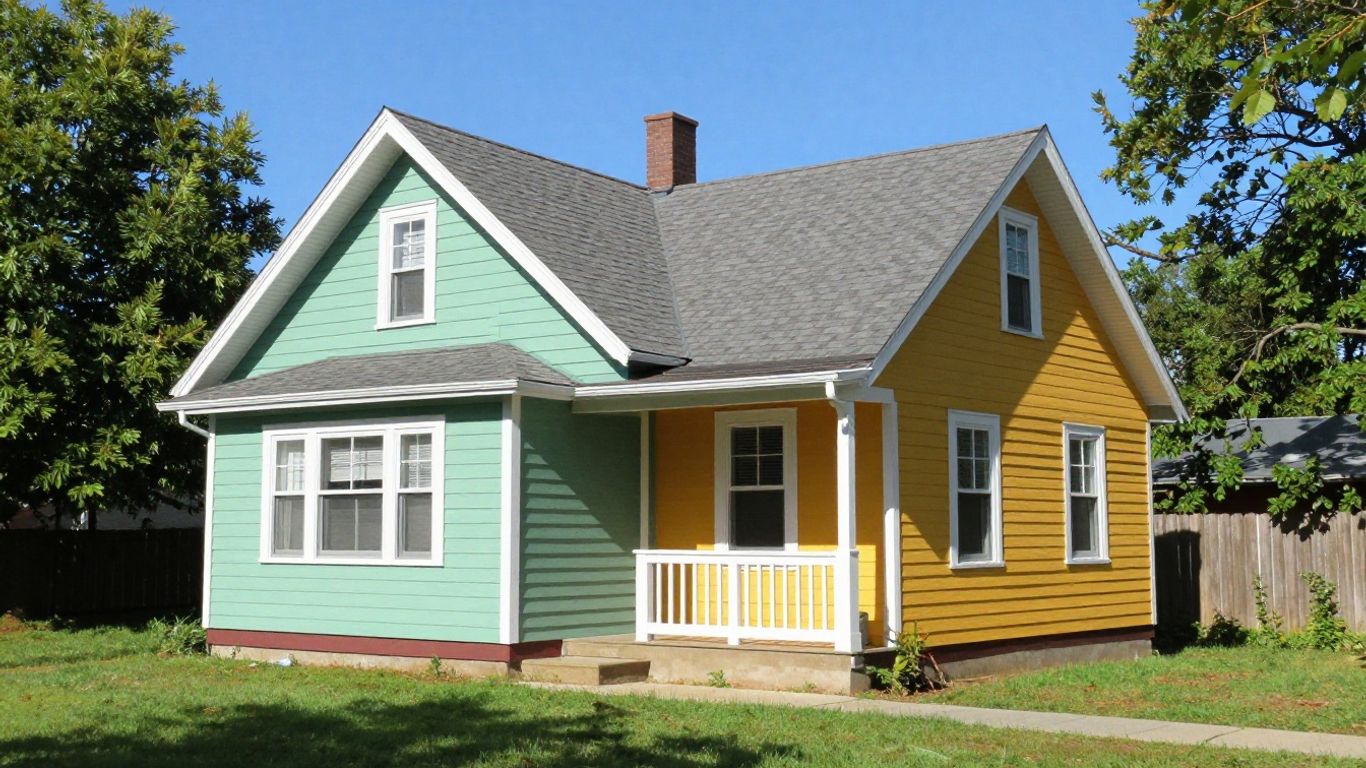
Picking the right paint color for your house can feel like a big gamble. You look at those tiny paint chips, maybe hold them up to the house for a second, and then hope for the best. But what if there was a way to actually see your house in a new color before you even buy a single can of paint? That’s where exterior house paint AI free tools come in. They let you try out different looks without any of the usual stress or expense.
Key Takeaways
- Traditional paint chips don’t show how a color will look on your whole house in different lights and next to other features.
- Exterior house paint AI free tools let you upload a photo of your home and visualize new paint colors digitally.
- These AI tools can show realistic paint finishes, considering light and surface texture, making the visualization more accurate.
- You can often mix and match colors from different brands and paint different parts of your house, like the siding, trim, and doors, independently.
- After you find a look you like with exterior house paint AI free visualization, you can get paint samples and share your chosen design with painters for accurate quotes.
Visualize Your Home’s Exterior Paint Colors For Free
Choosing the right exterior paint color for your home can feel like a huge gamble. You spend hours looking at tiny paint chips, trying to imagine how that little square will look covering your entire house. It’s a process that often leads to second-guessing and, sometimes, costly mistakes. This is where free AI exterior paint visualizer tools come in, letting you see your home in new colors before you even buy a single can of paint.
Why Traditional Color Selection Methods Fail
Let’s be honest, picking paint colors from a small chip is tough. Those little squares don’t account for how light hits your house throughout the day or how the color will look next to your roof, landscaping, or even your neighbor’s house. It’s like trying to pick out an outfit for a party based on a postage stamp-sized picture.
- Scale Issues: A color that looks great on a tiny chip can appear much more intense or washed out when applied to large surfaces like siding or garage doors.
- Lighting Differences: The same color can look completely different on a north-facing wall compared to a south-facing one due to natural light.
- Environmental Factors: Your home’s surroundings – trees, other buildings, even the sky – all influence how a paint color is perceived.
The reality is, paint chips are a poor representation of how a color will actually appear on your home’s exterior. They don’t capture the nuances of light, shadow, and surrounding elements that dramatically alter the final look.
The Physics Problem of Paint Color
It’s not just about the pigment itself. The way paint looks is affected by a few key things:
- Surface Texture: Rough surfaces like stucco or wood grain absorb and reflect light differently than smooth finishes, changing the color’s appearance.
- Light Conditions: Morning sun, harsh midday light, and evening shade all play tricks on the eyes, making colors shift throughout the day. You can explore how different shades look using tools like the PPG Colour Visualizer.
- Scale: As mentioned, larger areas make colors seem more vibrant. What looks subtle on a chip can become overwhelming on a whole house.
Understanding Scale and Surroundings
Think about how a color looks next to its neighbors. Your roof color, the brickwork, the landscaping, even the color of the house next door – all these elements interact with your chosen paint. An AI visualizer allows you to see your home in its actual environment, taking these interactions into account. This is a big step up from just looking at paint swatches in isolation. You can try out real colors from top brands and see how they truly fit your home’s unique setting, avoiding the common pitfalls of traditional color selection.
How the AI Paint My House Tool Works
So, you’ve decided to take the plunge and repaint your home’s exterior. That’s a big step, and honestly, a bit of a gamble if you’re just relying on those tiny paint chips. This is where the magic of AI comes in, turning a potentially stressful decision into something actually fun and, dare I say, easy. It’s like having a crystal ball for your house’s future look.
Photograph Your Home Correctly
First things first, the AI needs a good picture to work with. Think of it like giving a chef the best ingredients – the better the photo, the better the final dish (or visualization, in this case). You want to capture your home in the best possible light, literally.
- Lighting is Key: Aim for an overcast day. This gives you even light without harsh shadows that can make colors look weird. Direct sunlight hitting the whole house is also good, but avoid situations where half the house is in shadow.
- Get the Angle Right: Stand directly in front of your house. Try not to shoot from a sharp angle, as this can distort how the colors will actually appear on your walls. You want to see the true shape of your home.
- Capture Everything: Make sure the photo includes the entire front of your house, from the roofline all the way down to the foundation. Don’t forget to include some of the surrounding landscaping too; it all plays a part in how the colors will look.
- Resolution Matters: Use a decent camera or smartphone. A high-resolution image, ideally 4K or at least 1080p, will give the AI more detail to work with, leading to a more accurate visualization.
Avoid taking pictures when the sun is directly behind your house (backlit) or when deep shadows from trees or other structures are covering large parts of the facade. A clear, well-lit, full-frame shot is your best bet.
The goal here is to provide the AI with a realistic base. If the photo is distorted or poorly lit, the resulting visualization won’t be a true representation of how the paint will look on your actual home.
Upload Your Photo to Render Mode
Once you’ve got that perfect shot, it’s time to upload it. Most tools have a specific mode for this, often called ‘Render Mode’ or something similar. This isn’t just a simple photo editor; it’s designed to understand the different parts of your house – the walls, the trim, the roof, the windows – and keep them intact while it works its color magic. It’s pretty neat how it preserves architectural details like window frames and rooflines, making sure your home still looks like your home, just with a fresh coat of paint.
Craft Your Color Prompt for Accuracy
This is where you get to be the director. Instead of just saying "blue house," you need to be specific. Think about all the elements you want to change. A good prompt might look something like this:
[House Style] home with [Main Body Color] siding, [Trim Color] trim, [Front Door Color] front door, [Shutter Color] shutters, existing [Roof Color] roof, photorealistic, natural daylight.
For example, you could try: "Colonial home with warm gray siding, crisp white trim, navy blue front door, black shutters, existing charcoal shingle roof, photorealistic, natural daylight." The more detail you provide, the closer the AI can get to showing you exactly what you envision. It’s all about communicating your desired look clearly to the AI visualization tool.
This process allows you to experiment with countless combinations without ever touching a paintbrush. You can see how different shades interact with your home’s unique architecture and its surroundings, making the final decision much easier and more confident. It’s a game-changer for anyone looking to update their home’s exterior.
Explore Endless Exterior Paint Possibilities

So, you’ve got your photo uploaded and you’re ready to start playing with colors. This is where the fun really begins. Forget those tiny paint chips you squint at in the store; this tool lets you see your actual house transformed.
Try Real Colors From Top Brands
It’s not just about picking any old color. The AI tool gives you access to a massive library of shades from well-known paint manufacturers. We’re talking thousands upon thousands of colors, so you can be sure you’re looking at options that are actually available to buy. This means you can experiment with Sherwin-Williams, Benjamin Moore, Behr, and many others, all in one place. It’s like having a virtual paint store right at your fingertips.
Mix and Match Paint Brands and Colors
Who says your siding has to be the same brand as your front door? With this technology, you can mix and match. Maybe you want a specific blue for your main walls from one company and a bold accent color for the trim from another. The tool handles it, letting you create unique combinations that would be a headache to visualize otherwise. You can even try out different finishes, like matte or satin, to see how they look.
Visualize Multiple Surfaces Independently
Your home has different parts, right? Walls, trim, shutters, the front door, the garage door – they all can take different colors. This AI lets you select each of these areas and paint them separately. You can see how a classic white trim looks against a deep green siding, or how a bright red door pops against a neutral facade. It makes planning the whole look much more detailed and realistic.
Trying out different color schemes on your actual home before committing is a game-changer. It removes so much of the guesswork and potential for costly mistakes that come with traditional methods. You get to see the final look, not just a small sample.
This ability to preview your home in countless color combinations is a huge step up from just looking at paint swatches. It helps you avoid that sinking feeling of realizing your chosen color looks totally different on your house than it did on the chip. You can preview exterior paint colors with confidence.
Key Features of Exterior House Paint AI Free Tools

Free Exterior Paint Visualization
Getting started is super easy. You get one free exterior paint visualization to try out. This means you can take a picture of your house and see how a new color looks without spending a dime. It’s a great way to get a feel for the tool and see if it’s right for you before you commit to anything. If you like what you see and want to try more options, there are credit packs available, usually in sets of 5, 15, or 50, for additional visualizations. This initial freebie really takes the pressure off when you’re just starting to explore ideas.
Extensive Paint Library Access
Forget just a handful of basic shades. These tools give you access to a massive library of colors, often featuring tens of thousands of options from all the big paint brands you know. We’re talking about everything from Behr and Benjamin Moore to Sherwin-Williams and Valspar, and many, many more. You can even mix and match colors from different brands within the same visualization. Want Sherwin-Williams on your siding and Benjamin Moore on your front door? No problem. It’s like having a virtual paint store at your fingertips, letting you explore a huge range of possibilities.
Save and Share Your Visualizations
Once you’ve found a look you love, you don’t have to lose it. The ability to save your favorite visualizations is a big plus. You can keep track of different color combinations you’ve tried and compare them later. Even better, you can easily share these saved images with family, friends, or even your contractor. This makes getting opinions or discussing your plans much simpler. Instead of trying to describe a color, you can just show them exactly what you have in mind. It really helps get everyone on the same page before any paint is actually bought or applied. This feature is a game-changer for collaborative projects and making sure everyone agrees on the final look. You can even use these saved images to get more accurate quotes from painters, as they’ll have a clear picture of your desired outcome get paint samples and test in real life.
The AI doesn’t just slap a flat color over your photo. It tries to account for how light hits different surfaces and textures, making the preview look much more like the real thing. This means you get a better sense of how the color will actually appear on your home’s unique features, not just a generic block of color.
Transform Your Home Instantly With AI
Beyond Basic Paint Swatch Apps
Forget those tiny paint chips that never quite look right on your actual house. Traditional methods often leave you guessing, and honestly, who wants to spend thousands of dollars on a paint job only to regret the color choice later? This AI tool is different. It takes your home’s photo and lets you try out colors in a way that feels real. You’re not just slapping a flat color over a picture; you’re seeing how it might actually look.
Realistic Paint Finishes With Light Interaction
One of the coolest parts is how the AI handles light. You know how a color can look totally different in the morning sun versus the shade? This tool tries to show that. It considers how light hits different surfaces and even how shadows fall, giving you a much better idea of the final look. It’s like having a virtual sun and shadow simulator for your house.
Preserving Your Home’s Architecture
This isn’t about changing your house’s character. The AI is smart enough to keep all the important details – your windows, trim, rooflines, even the landscaping – just as they are. It focuses on the paint, making sure the visualization respects the original design of your home. You can experiment freely without worrying about distorting the look of your place. It’s a great way to explore new paint ideas without any commitment, letting you visualizee.ai your home’s potential.
The AI doesn’t just change colors; it simulates how those colors would appear under real-world lighting conditions, taking into account the textures of your home’s surfaces and the surrounding environment. This level of detail makes the visualization far more accurate than simply overlaying a color swatch.
Bringing Your AI Visualizations to Reality
So, you’ve spent some time playing around with the AI tool, trying out different color combos, and you’ve finally landed on the perfect look for your home’s exterior. That’s awesome! But now comes the part where you actually make it happen. It’s easy to get lost in the digital world, but the goal is to get that paint on your actual house, right?
Get Paint Samples and Test in Real Life
First things first, take those digital colors to the paint store. The AI gives you a fantastic preview, but real-world paint chips and samples are still your best friends. The folks at the paint counter can help you find the closest matches from their brand’s collection. Once you have a few potential candidates, don’t just hold the little chip up to your house. You need to paint larger sample boards – think at least 2×2 feet. Why so big? Because colors look totally different when they cover a large area compared to a tiny square. Plus, you’ll want to see how those samples look on your actual house, at different times of the day, with the sun hitting them and in the shade. This step is super important because paint chips can be deceiving.
Share Your Vision With Professional Painters
Once you’ve narrowed down your choices and have your real-life samples, it’s time to talk to painters. Showing them your AI visualization is way better than just describing it. It gives them a clear picture of exactly what you’re going for. This clear communication helps them provide more accurate quotes for the job. You don’t want any surprises down the line about what colors are going where, especially if you’re painting multiple surfaces like the siding, trim, and doors different colors. A good painter will appreciate having a solid reference point.
Document Everything for Accurate Quotes
Keep records of everything. Save those AI visualizations you loved. If you have specific paint colors picked out, note them down. Having all this information documented makes the quoting process smoother and helps prevent misunderstandings. It’s like having a blueprint for your paint job. This way, everyone involved – you, the painter, and even yourself later on – knows exactly what the plan is. It’s a small step that can save a lot of headaches and potential costs.
Repainting your home’s exterior is a big investment. The AI tool helps you avoid costly mistakes by letting you see the final look before you commit. It bridges the gap between imagination and reality, giving you the confidence to move forward with your project.
So, What’s the Verdict?
Alright, so we’ve talked about how picking the right exterior paint color can be a real headache. Those little paint chips just don’t cut it when you’re looking at your whole house. But using a tool like the AI exterior house paint visualizer? That’s a game-changer. It lets you play around with tons of colors on your actual home, for free, before you even buy a single can. No more guessing, no more expensive mistakes. It really takes the stress out of a big decision like this, giving you a clear picture of how your home will look. Give it a try – you might be surprised at how easy it makes choosing your home’s next look.
Frequently Asked Questions
What is an exterior house paint AI tool?
An exterior house paint AI tool is like a magic paintbrush for your home’s outside. You upload a picture of your house, and the AI lets you try out different paint colors on it instantly. It helps you see how a new color will look before you actually buy any paint, saving you time and money.
How do I get started with a free AI paint visualizer?
Usually, you just need to find a website or app that offers a free paint visualizer. Then, you’ll upload a clear photo of your house’s exterior. The tool will then let you pick colors and see them on your house right away, often for your first try.
Why is it better to use an AI tool than paint chips?
Paint chips are tiny! A color can look totally different when it covers a whole house, especially with sunlight and shadows. AI tools show you the color on your actual house, so you get a much more realistic idea of how it will look. It’s like trying on clothes before you buy them, but for your house.
Can I try colors from different paint brands?
Many AI paint visualizers let you choose from a huge list of colors from popular paint brands like Sherwin-Williams, Benjamin Moore, and Behr. You can even mix and match colors from different brands on different parts of your house, like the walls, doors, and trim.
What if I want to paint my shutters or front door a different color?
Great question! Most advanced AI tools let you paint different parts of your house separately. You can pick one color for the main walls, another for the trim, and a third for the front door or shutters. This gives you lots of control to create the perfect look.
What should I do after I find a color I like with the AI tool?
Once you’ve found a color combination you love using the AI tool, it’s a good idea to get small paint samples. Test these samples on a piece of your actual house or on a large board outside. This lets you see the color in real sunlight and weather before you commit to buying gallons of paint.


Leave a Reply